Page Type

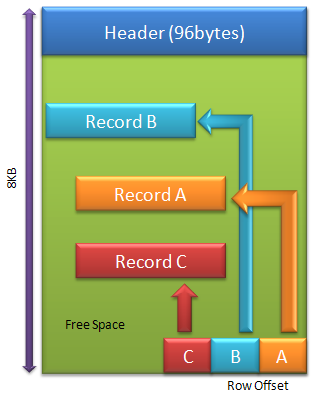
There are different types of pages in SQL Server. No matter what types of pages are, the layout of the page is the same. A data file consists of numbers of 8k-pages. A Page includes 8192 bytes. First 96 bytes are used for header. The rest of the space is for data. A variable length row offset array (or slot array) is located at the end of every page and grows backwards. Count of records (size of array) is saved in the header. The size of each element in the offset array is 2 bytes. Records in a page are not sorted even though it is an index page. If the data needs to be sorted, the offset array will be is sorted by the key of the index.

As far as I know, there are about 14 types of pages in SQL Server data file.

  • Type 1 – Data page.
    • Data records in heap
    • Clustered index leaf-level
    • Location can be random
  • Type 2 – Index page
    • Non-clustered index
    • Non-leave-level clustered index
    • Location can be random
  • Read more

TechDays Canada 2011 – Vancouver BC, Nov 15 and 16.

TechDays Canada 2011 – Vancouver Nov 15 and 16 I am going to present “The T-SQL Cookbook: What’s Cool in Microsoft SQL Server 2008 R2 and New in SQL Server 2012” at TechDays 2011 Vancouver 1:00PM 16, 2001, http://www.microsoft.com/canada/techdays/2011/. I will talk about new programming features introduced in SQL Server 2012 in the session. Ok, … Read more

Locking and Blocking (6) – NoLock

Nolock table hint tells SQL Server engine to not place locks to rows and/or pages while reading them. With this hint enabled, query will not be blocked by any row level modification. It’s equivalent to READUNCOMMITTED table hint in which it allows query return uncommitted data. Many people probably already know that schema stability lock will be applied to the table being access with this table hint, but it’s not always the trueth. In some cases, it will apply Shared lock to the HOBT — partition.

Read more

Setup Procedure to Run Automatically When SQL Server Starts

That’s simple, setup a job and run the procedure and schedule it runs when SQL Server agent started. See the problem here? My title is “when SQL Server Start”, not “When SQL Server Agent”. SQL Server can start without agent. Procedure in SQL Server can be started automatically when SQL Server starts. In order to do that, you have to set “scan for startup procs” through sp_configure function, and then use sys.sp_procoption to set a procedure to be launched as server started. See example below.

Read more

Locking and Blocking (5) – Lock Resources in Extended Events

Three columns resource_0, resource_1, and resource_2, returned from Extended Events which monitors the locking behavior,lock_acquired and lock_released, are always puzzling people. Actually, information of it already exposed in page 264, book Microsoft SQL Server 2008 Internals, wirtten by Kalen Delaney. In my first post of this series, I’ve also talked little bit about it. I decided to write a function to help people translate them into a human readable form. This function now can recognize lock resource for Object, HOBT, Page, Extent, RID, and KEY. for others, such as DATABASE and FILE, the formats are very straight forward, I did not include them in the function.

Read more

Merge Statement

Merge statement was introduced by Microsoft in SQL Server 2005. It allows user to merge one table to another combining different ways of operation, inserting, deleting and updating, on the targeting table based upon the condition specified in the merge statement.
When Matched: It means when the record in the source table and target table matched by key. In this case, you have option of, update target or delete target.
When Not Matched: It means the records in the source table do not exist in the target. The possible operation is to insert record to the target.
When Not Matched By Source: it means the records are in target table but not in the source table. In this case, you can choose to update or remove the record in the target table .

Read more

Locking and Blocking (4) – How It Works

Behind locking, there must be a queuing mechenism implemented in the base framework. In C#, if multiple threads are running the same code below, when the first thread successfully acquired a lock on syncObject and continues the code within the brace, the second thread will be waiting for the lock on syncObj to be released. If the third thread comes in, it will wait until the second thread finishes the execution of the code in the brace bracket.

lock(syncObj)
{
	//You code here
}

Whenever you use locks like the code above, a FIFO (first-in-first-out) queue is implicitly created internally; every requests will be queued until the previous request dequeued and finishes its work. SQL Server locking system has such concept as well but it’s more sophisticated. In my this example, lock(){} is equivalent to applying exclusive lock to a resource(syncObj above) in SQL Server.

Read more

Locking and Blocking (3) – Update and Exclusive Locks

Update and Exclusive locks mostly are used for Data Manipulating Language delete and update. Fisrt of all, let’s have a quick glance below:

use tempdb
set nocount on 
if OBJECT_ID('abc') is not null
	drop table abc
create table abc(id int)
insert into abc values(1),(2),(3)
begin transaction
delete abc where id = 1
exec sp_lock @@spid
rollback transaction
/*
spid   dbid   ObjId       IndId  Type Resource                         Mode     Status
------ ------ ----------- ------ ---- -------------------------------- -------- ------
52     2      1365579903  0      RID  1:172:0                          X        GRANT
52     2      1365579903  0      PAG  1:172                            IX       GRANT
52     2      1365579903  0      TAB                                   IX       GRANT
52     1      439672614   0      TAB                                   IS       GRANT
*/

From result, you can ignore the line 17, the IS lock on that line on master database (dbid = 1) is look up values in the master database, like RID, PAG, TAB. While data being deleted, there’s on IX (Intent Exclusive) lock granted to the table (TAB), IX lock on the page where the records located, and X (eXclusive) lock on the row. After transaction is rolledback or committed, the lock on those resources will be release. Seem like there is nothing to the Update lock. That’s true if you use this tool or sys.dm_trans_locks to check the locking behaviour. Your will see more locks by using below.

Read more

Locking and Blocking (2) – Shared Locks and Lock Resource

I talked about tools can be used for analyzing locking behaviors in prevous post. In this post, I am going to describe shared lock and intent shared locks and how to extract index key hash value and index from the returning value of Extended Event. Shared lock and Intent Shared lock are used while reading the data from tables. They called “shared” because if there are one record holding a S lock on an record, other sessions can hold the S lock on the same record. You may think this lock is useless. That’s true if SQL Server only supports those 2 type of locks. In my later post, more lock types will come. The S lock conflicts with Exclusive(X) locks. While an Shared lock is holding, an Exclusive lock will wait. Think about this question, will you allow others to drop a database you connected? No, because there is an Shared lock on the database when a connection is on it.

Read more

Locking and Blocking (1) – Tools

I am going to start a series of posts to talk about Locking and blocking in SQL Server, which is one of my favorate topics. As a SQL Server developer, many professionals are more focusing on programming languages, database designs, features (like Service Broker), writting SQLs to effectively manipulate data and process designs. They’re all correct. But one more thing is quite frequently getting neglected is locking. Especially after SQL Server 2005, Snapshot isolatioin level is used more frequent than others. It seems like SQL Server will never locked. Actually, that’s not the fact. Nothing has been changed from locking perspective before and after version 2005. After having a fully understanding of locking and blocking mechanism, you will find out you can easily write a high concurrency application, prevent excessive blocking, and design more sophisticated concurrent SQL process controls.

Read more