
There are always concerns while writing a multi-threading program. In the last post, the considerations are degree of parallelism and tasks starving from getting workers. Max threads for one scheduler can be restricted by applying counting semaphore as I posted there. But it still does not resolve worker starvation issue. The application structure in last post is to use pool of threads managed by Service Broker to schedule tasks issued from differrent scheduler. Based on this structure, definitely you can dedicate time on coding at the activation procedure or initiator side to make the worker to go round robbin manner to excute all tasks and hence eliminate the starvation at some level. Thread starvation will still happen under the situation that large amount of long tasks are scheduled. We cannot specify thread quantum to overcome the issue. However, we can definitely utilize the nature of SQL Server to overcome the issue.
In general, the idea is that I assign one broker queue to one scheduler so that the semaphore is controlled by MAX QUEUE READER and there will be no interference between schedulers if one scheduler takes more threads. The quantum will be controlled by SQL Server Engine. Let’s only talk about a simplified scenaro in this blog post – one scheduler. We are going to use only a ver important feature in service broker — the receiving order of messages within a conversation is same as the sending order. Will this mean we can only have one thread at target (activation procedure) side? If you activation procedure is designed in the way that entire procedure is running in a transaction, the messages will be processed sequientially regardless the value on MAX QUEUE READER.
create procedure QueueActivation
as
begin
	begin transaction
	receive...
	...
	--Your Work
	...
	commit
end
But if you process your message processor is designed in this way, the situation changes. Once the transaction is committed, next message will be received by other activation thread while the prior thread is doing “Your Work”.
create procedure QueueActivation
as
begin
	begin transaction
	receive...
	commit
	...
	--Your Work
	...
end
We will send the tasks with the same order number to the service broker sequentially. The tasks needed to be run after the first set of tasks will be sent sequentially as well after the tasks in previous order sent. The tasks will be received at target in order. We can put binary semaphore in the initiator side to allow only one thread to send a task at a time. At the target we need to ensure all tasks with order number, for instance 100, can be running together, where tasks with order number 200 must running all 100s complete. While tasks with order 100 are running, tasks tagged with 400, 500, or even more are already int he queue. So those tasks must wait. We don’t want to have a status table and keep looping and searching it
The solution has been figured in my previously written post , Locking and Blocking (11) – Process Control and Customized Locking Hierarchies. We are going to use application locks. When a task is running, a lock on a resource is granted during the execution. Tasks with the same order are sharing the same lock resource (don’t conflict with each other). Tasks in the next order will share different lock resource but must be conflicting with the lock held in previous order. So, we need 2 type of locks conflicting with each other but does not conflicting itself. I use Intent Exclusive and Shared lock, because they don’t conflict with themself but do with each other.
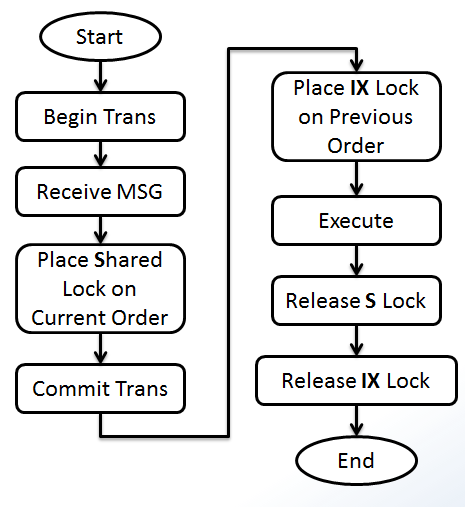
Another requirement of this design is when a message is received, we must know the order of previous task. This is simple. We can always embed that as part of the message. See the implementation below.
create table ExecutoinLog
(
	ExecutinLogID int identity(1,1) primary key,
	SQL nvarchar(max),
	StartTime datetime2(7) default(sysdatetime()),
	EndTime datetime2(7)
)
go
create procedure ExecSQL(@SQL nvarchar(max))
as
begin
	set nocount on
	declare @ExecutionLogID int
	insert into ExecutoinLog (SQL)
		values(@SQL)
	select @ExecutionLogID = SCOPE_IDENTITY();
	exec(@SQL)
	update ExecutoinLog
		set EndTime = sysdatetime()
	where ExecutinLogID = @ExecutionLogID
end

go
create procedure ActivationSchedulerQueue
as
begin
	declare @Handle uniqueidentifier, @Type sysname, @msg xml
	begin transaction
	waitfor(
		Receive top (1)
			@Handle = conversation_handle,
			@Type = message_type_name,
			@msg = cast(message_body as xml)
		from SchedulerQueue
	), timeout 500
	if @Handle is null
	begin
		rollback
		return;
	end
	if @Type = 'DEFAULT' and @msg is not null
	begin
		declare @SQL nvarchar(max), @PreviousOrder int, @CurrentOrder int,
				@ResourcePrevious nvarchar(255),
				@ResourceCurrent nvarchar(255)
		select	@SQL = @msg.value('(//@SQL)[1]', 'nvarchar(max)'),
				@PreviousOrder = @msg.value('(//@PreviousOrder)[1]', 'int'),
				@CurrentOrder = @msg.value('(//@CurrentOrder)[1]', 'int')

		select @ResourceCurrent = 'SchedulerQueue - ' + CAST(@CurrentOrder as varchar(20))
		exec sp_getapplock @Resource = @ResourceCurrent,  @LockMode = 'Shared', @LockOwner = 'Session', @LockTimeout = -1

		commit

		select @ResourcePrevious = 'SchedulerQueue - ' + CAST(@PreviousOrder as varchar(20))
		exec sp_getapplock @Resource = @ResourcePrevious,  @LockMode = 'IntentExclusive', @LockOwner = 'Session', @LockTimeout = -1

		begin try
		exec ExecSQL @SQL
		end try
		begin catch
			-- place your error handling code here
		end catch

		exec sp_releaseapplock @ResourcePrevious, 'Session'
		exec sp_releaseapplock @ResourceCurrent, 'Session'
	end
	else
	begin
		commit
		end conversation @Handle;
	end
end
go
create queue SchedulerQueue
	with status = on,
	activation(
				status = on,
				procedure_name = ActivationSchedulerQueue,
				max_queue_readers = 5,
				execute as self
				)
go
create service ServiceScheduler on queue SchedulerQueue([DEFAULT])
go
create procedure ExecAsync (@msg xml)
as
begin
	if @msg is null
		return;
	declare @handle uniqueidentifier
	select @handle = conversation_handle
	from sys.conversation_endpoints
	where is_initiator = 1
		and far_service = 'ServiceScheduler'
		and state <> 'CD'
	if @@ROWCOUNT = 0
	begin
		begin dialog conversation @handle
		from service ServiceScheduler
		to service  'ServiceScheduler'
		on contract [DEFAULT]
		with encryption = off;
	end;
	send on conversation @handle message type [DEFAULT](@msg)
	return
end
go
Test code is
--test
if object_id('tempdb..#SQLs') is not null
	drop table #SQLs
create table #SQLs (SQL nvarchar(max) not null, ExecutionOrder int not null)
create clustered index ExecutionOrder on #SQLs(ExecutionOrder)
go
declare @SQL nvarchar(max) = 'waitfor delay ''00:00:10.100'''
insert into #SQLs(SQL, ExecutionOrder) values(@SQL, 100)
insert into #SQLs(SQL, ExecutionOrder) values(@SQL, 100)
insert into #SQLs(SQL, ExecutionOrder) values(@SQL, 100)
insert into #SQLs(SQL, ExecutionOrder) values(@SQL, 100)
go
declare @SQL nvarchar(max) = 'waitfor delay ''00:00:09.200'''
insert into #SQLs(SQL, ExecutionOrder) values(@SQL, 200)
insert into #SQLs(SQL, ExecutionOrder) values(@SQL, 200)
go
declare @SQL nvarchar(max) = 'waitfor delay ''00:00:08.300'''
insert into #SQLs(SQL, ExecutionOrder) values(@SQL, 300)
go
declare @SQL nvarchar(max) = 'waitfor delay ''00:00:07.400'''
insert into #SQLs(SQL, ExecutionOrder) values(@SQL, 400)
insert into #SQLs(SQL, ExecutionOrder) values(@SQL, 400)
go
declare @SQL nvarchar(max) = 'waitfor delay ''00:00:06.500'''
insert into #SQLs(SQL, ExecutionOrder) values(@SQL, 500)
go
select * from #SQLs
go
set nocount on
declare @SQL nvarchar(max), @CurrentOrder int, @PreviousOrder int, @msg xml
declare c cursor for
	select  SQL [SQL], ExecutionOrder [CurrentOrder],
			isnull(
				(select top 1
					ExecutionOrder
				from #SQLs s2
				where s1.ExecutionOrder > s2.ExecutionOrder
				order by ExecutionOrder desc
				), 0) [PreviousOrder]
	from #SQLs s1
	order by ExecutionOrder
open c
fetch next from c into @SQL, @CurrentOrder, @PreviousOrder
while @@fetch_status = 0
begin
	select @msg = (select @SQL [@SQL], @CurrentOrder [@CurrentOrder], @PreviousOrder [@PreviousOrder] for xml path('Command'));
	--select @msg
	exec ExecAsync @msg
	fetch next from c into @SQL, @CurrentOrder, @PreviousOrder
end
close c
deallocate c
go
select * from #SQLs
select * from ExecutoinLog
select * from sys.conversation_endpoints
We don’t have GetScheduler procedure here. If you need to use this structure to serve multiple callers, each caller will need a service broker created with almost the same code. You can create number of them in advance. If application run out of scheduler, you can add schedulers in GetScheduler procedure. Once thing you need to be aware of is that, when you increase number of MAX QUEUE READER, number of threads will be increased. But when you decrease that number, total number of threads will NOT be reduced immediately, see blog post here