
In my last post of this series, I explain how to use message queue of service broker to deliver the tasks to and execute them at conversation target. We did not talk about complex ordering in that scenario. We can also see that the ended conversations stay in the conversation endpoint which will affect the performance of service broker. Ending a conversation with cleanup option can result this issue. It’s not suggested however. In this article, I am going to talk about how to implement complex ordering using Service Broker as a message conveyer and performer but reducing number of conversation handles.
The biggest problem showing in last post is that the callers initiate one conversation for each SQL task, as a result, the number of conversations, as many tasks as caller issued, hit the conversation endpoint eventually. That will directly cause performance issue on receiving command. To mitigate the presure of conversation endpoint, we can use one conversation for a series of Tasks invoked by one caller and end the conversation at the end. Alternatively, the conversation can be reused, which will be talked in next post.
The design is illustrated below. A list of tasks, where tasks with the same order can be run at the same time, are needed to be scheduled. 2 services are created as a core of the scheduler. The initiator communicate with caller directly sending the tasks to the target as well as receiving messages returned from the target. Now the “physical” infrastructure is created.
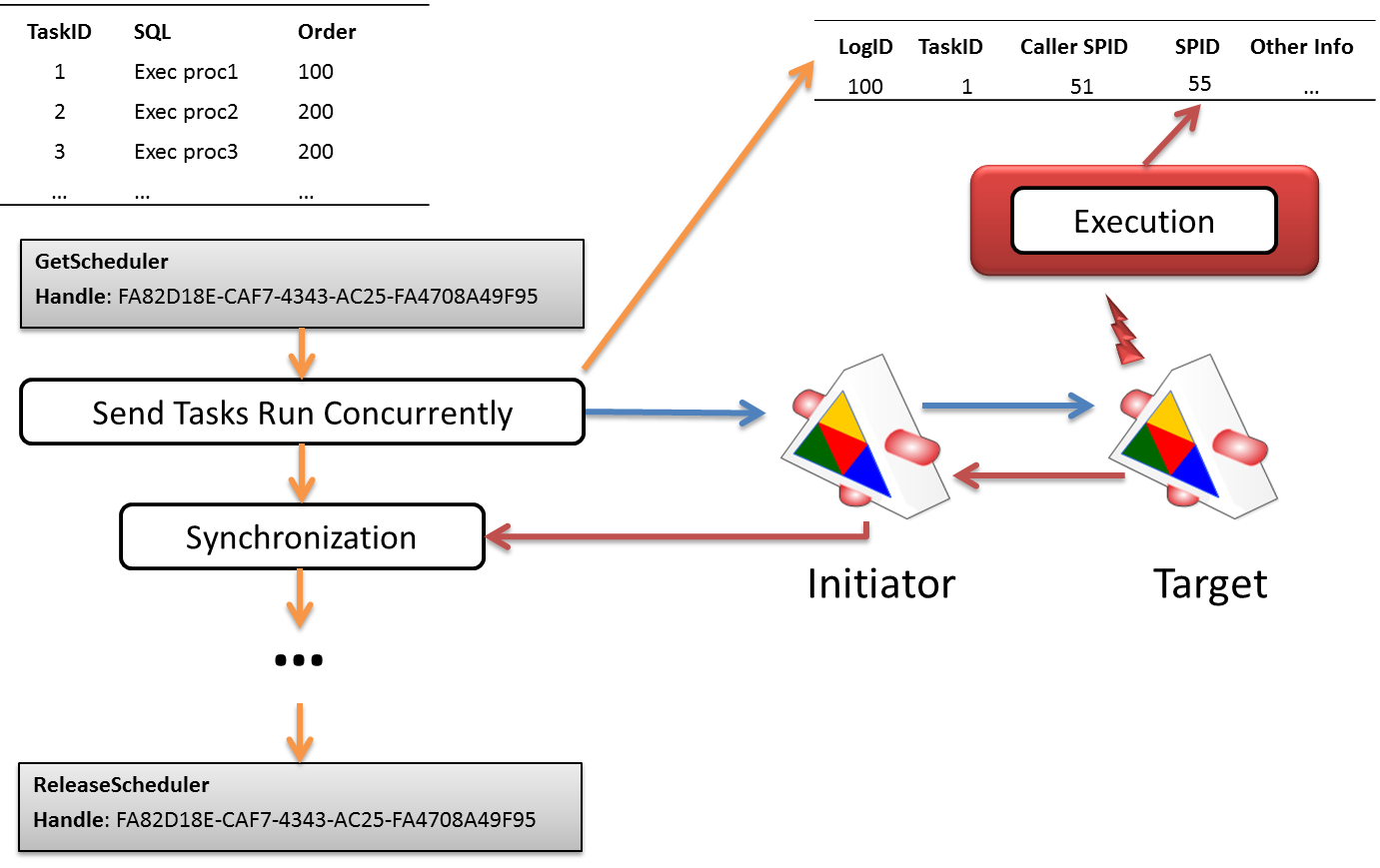
Caller firstly calls procedure GetScheduler to get a scheduler handle which is a newly created conversation handle. This conversation (scheduler) handle will be used later for all scheduler related activities. Then the tasks which are running at the same time are pushed in to the queue through procedure ExecAsync along with scheduler handle. Every invocation of ExecAsync will populate a record in ExecutionLog for logging and monitoring purpose, then, it will send task with LogID as a message to the Target service through Initiator. Once target receives the command, Activation procedure will be executed. It update the ExecutionLog table with start datetime and its SPID, execute the task, update the ExecutionLog with task completion time, and then send AsyncDone message back to Initiator. While one activation procedure is executing one task, more tasks might be sent over for processing. Every completed tasks will send AsyncDone message back to initiator.
At initiator side, once the tasks with same order are sent over, caller will call Synchronization process to wait until all sent tasks to complete. This procedure receives one AsyncDone message at once with filter Scheduler (conversation) Handle. If 10 tasks are sent, 10 AsyncDone messages should be received. Once all AsyncDone messages are received, the caller is ready for sending next series of command for execution. At the end, the caller released the scheduler (conversation).
use master
--create test environment
if DB_ID('test') is not null
begin
	alter database test set single_user with rollback immediate
	drop  database test
end
go
create database test
--enable the service broker
alter database test set enable_broker
go
use test
go
--create ExecutionLog table
create table ExecutionLog
(
	LogID int identity(1,1) primary key,
	CallerID int,--Who sent the message
	SchedulerHandle uniqueidentifier, -- from which handle
	SPID int, -- who executed the task
	SQL nvarchar(max), -- task body
	--Start time, when the task is not executed,
	--this time is the time when caller sends the task.
	--When the task is executed, the StartTime will be the time task started.
	StartTime datetime2(7) default(sysdatetime()),
	EndTime datetime2(7) --Task completion time
)
go
-- This is for monitoring and cleanup purpose
create index SPID on ExecutionLog(SPID)
	include (CallerID, StartTime, EndTime)
where (EndTime IS NULL)
go

go
-- this is view we are going to use later to monitor the execution of task series.
create view ExecutionStatus
as
	select c.LogID, b.spid SPID, c.CallerID, c.StartTime, c.EndTime, c.SQL
	from sys.service_queues a
		inner loop join  sys.dm_broker_activated_tasks b on a.object_id = b.queue_id and b.database_id = DB_ID()
		left loop join ExecutionLog c with (nolock, index = SPID) on  c.EndTime is null and b.spid = c.SPID

go
--select * from ExecutionStatus
go
--Create message type
--When a task sent from Initiator to Taget, the task is tagged with AsyncSent
create message type AsyncSent validation = none

--When a task sent from Taget to Initiator, the task is tagged with AsyncDone
create message type AsyncDone validation = none
go
-- here is the contract as explained above
create contract AsyncContract
(
	AsyncSent sent by initiator,
	AsyncDone sent by target
)
go
--create essential components for initiator
create queue QueueAsyncInitiator
create service SerivceAsyncInitiator
on queue QueueAsyncInitiator(AsyncContract)
go
--create essential components for Target
create queue QueueAsyncTarget
create service SerivceAsyncTarget
on queue QueueAsyncTarget(AsyncContract)
go
----Activation at target, it's also a task executor
create procedure ActivationAsyncTarget
as
begin
	declare @Handle uniqueidentifier, @Message xml, @MessageType nvarchar(256)
	declare @SQL nvarchar(max), @LogID int
	while(1=1)
	begin
		select @Handle = null
		waitfor(
			receive top(1)
				@Handle = conversation_handle,
				@Message = cast( message_body as xml),
				@MessageType = message_type_name
			from QueueAsyncTarget
		), timeout 30000
		-- wait for 30 seconds. Because service broker will start threads gragually based on some algorithm
		-- until value of Max Queue Reader. We want a launched thread stay reasonable longer for receiving
		-- next message.

		if @Handle is null
			break;
		if @MessageType in ('http://schemas.microsoft.com/SQL/ServiceBroker/EndDialog', 'http://schemas.microsoft.com/SQL/ServiceBroker/Error')
		begin
			-- handling EndDialog and Error in the service broker
			end conversation @Handle;
			break;
		end
		if @MessageType = 'AsyncSent' -- received MSG is a task!
		begin
			select	@LogID = @Message.value('(/Command/@LogID)[1]', 'int'),
					@SQL = @Message.value('(/Command/@SQL)[1]', 'nvarchar(max)')
			--perform cleanup if there're any terminated processes
			update a
				set EndTime = GETDATE()
			from ExecutionLog a with(index = SPID)
			where SPID = @@SPID
				and EndTime is null
			-- Set task startup time
			update ExecutionLog
				set StartTime = GETDATE(),
					SPID = @@SPID
			where LogID = @LogID

			begin try
				-- do the work.
				-- This piece of code should not fail.
				-- You may consider using CLR with different connection
				-- so that any disconnection will be caught by catch block below
				exec(@SQL)
			end try
			begin catch
				--You Error handling code
			end catch
			-- done, log the time
			update ExecutionLog
				set EndTime = GETDATE()
			where LogID = @LogID
			-- send message back
			select @Message = (select @LogID as [@LogID] for xml path('Command'))
			;send on conversation @handle message type [AsyncDone](@Message)
		end
	end
end
GO

go
--attach Activation Procedure to target queue
alter queue QueueAsyncTarget
	with status = on,
	activation(
				status = on,
				procedure_name = ActivationAsyncTarget,
				-- here I am using a unrealistic value but definitely
				-- we need bigger value here since all Schedulers
				-- will share the same set of activation threads
				max_queue_readers = 100,
				execute as self -- your own security model
				)
go
create procedure GetScheduler @SchedulerHandle uniqueidentifier output
as
begin
	-- begin a conversation
	begin dialog conversation @SchedulerHandle
	from service SerivceAsyncInitiator
	to service 'SerivceAsyncTarget'
	on contract [AsyncContract]
	with encryption = off
end
go
create procedure ReleaseScheduler @SchedulerHandle uniqueidentifier
as
begin
	-- release the conversation.
	-- I used try-catch block here since while this procedure is called,
	-- the conversation might be released by DBA manually :)
	-- Evil DBAs, but your are important :)
	begin try
		end conversation @SchedulerHandle;
	end try
	begin catch
	end catch
end
go
---Send message to service broker
create procedure ExecAsync @SchedulerHandle uniqueidentifier, @SQL nvarchar(max)
as
begin
	declare @Message xml, @LogID int
	insert into ExecutionLog(CallerID, SQL, SchedulerHandle)
		values(@@SPID, @SQL, @SchedulerHandle)
	select @LogID = scope_identity()
	select @Message = (select @LogID as [@LogID], @SQL as [@SQL] for xml path('Command')) -- @Order is just for information purpose
	;send on conversation @SchedulerHandle message type [AsyncSent](@Message);
end
go
-- Synchronization
create procedure Synchronization @SchedulerHandle uniqueidentifier
as
begin
	declare @MessageType sysname
	waitfor(
			receive top(1)
				@MessageType = message_type_name
			from QueueAsyncInitiator
			where conversation_handle = @SchedulerHandle
		), timeout -1
	if @MessageType != 'AsyncDone'
		raiserror('Unexpected message %s received! The conversation should be ended', 16,1, @MessageType)
end
go
A big code block above, I put a lot of comments in it rather than in the blog post. It’s the implementation in the way explained exactly before it. Now let’s test it
--test
declare @SchedulerHandle uniqueidentifier
declare @SQL nvarchar(max)
-- get a Scheduler handle
exec GetScheduler @SchedulerHandle output
begin try
	select @SQL = 'waitfor delay ''00:00:10.100'''
	-- Run 4 Tasks
	exec ExecAsync @SchedulerHandle, @SQL
	exec ExecAsync @SchedulerHandle, @SQL
	exec ExecAsync @SchedulerHandle, @SQL
	exec ExecAsync @SchedulerHandle, @SQL

	-- Call Synchronization 4 times since we queued 4 tasks
	-- Extra execution of this procedure will lead caller wait for ever
	exec Synchronization @SchedulerHandle
	exec Synchronization @SchedulerHandle
	exec Synchronization @SchedulerHandle
	exec Synchronization @SchedulerHandle


	select @SQL = 'waitfor delay ''00:00:09.200'''
	exec ExecAsync @SchedulerHandle, @SQL
	exec ExecAsync @SchedulerHandle, @SQL

	exec Synchronization @SchedulerHandle
	exec Synchronization @SchedulerHandle

	select @SQL = 'waitfor delay ''00:00:08.300'''
	exec ExecAsync @SchedulerHandle, @SQL

	exec Synchronization @SchedulerHandle


	select @SQL = 'waitfor delay ''00:00:07.400'''
	exec ExecAsync @SchedulerHandle, @SQL
	exec ExecAsync @SchedulerHandle, @SQL

	exec Synchronization @SchedulerHandle
	exec Synchronization @SchedulerHandle

	select @SQL = 'waitfor delay ''00:00:06.500'''
	exec ExecAsync @SchedulerHandle, @SQL

	exec Synchronization @SchedulerHandle
end try
begin catch
	-- your error handling code
end catch
--Release scheduler
exec ReleaseScheduler @SchedulerHandle
Then open another window and run
select * from ExecutionStatus
select * from ExecutionLog
It will show exactly which and where the processes are. We are almost close to the end of this post. What’s your consideration here? My consideration is semaphore control. What if I have 1000 tasks willing to run concurrently but each time only 3 active ones running? This can be overcome by applying semaphore at the caller side, see my post before. Well, if my max queue reader is 5, but I have 6 schedulers sending tasks over without semphore control. What would happen? It depends! But quite possible that one ore more schedulers will suffer from thread starvation. Let’s talk about them later.